
Traveling has become easier thanks to smartphones and mobile applications. Whether you’re booking a cheap flight from Manila, navigating the streets of Tokyo, finding accommodation in Bangkok, or managing expenses during a European vacation, the right travel apps can save time, reduce stress, and help you stay within budget.
However, with thousands of travel applications available, choosing which ones to install can feel overwhelming.
Some apps help you find affordable flights and hotels. Others provide offline maps, language translation, currency conversion, and real-time travel updates.
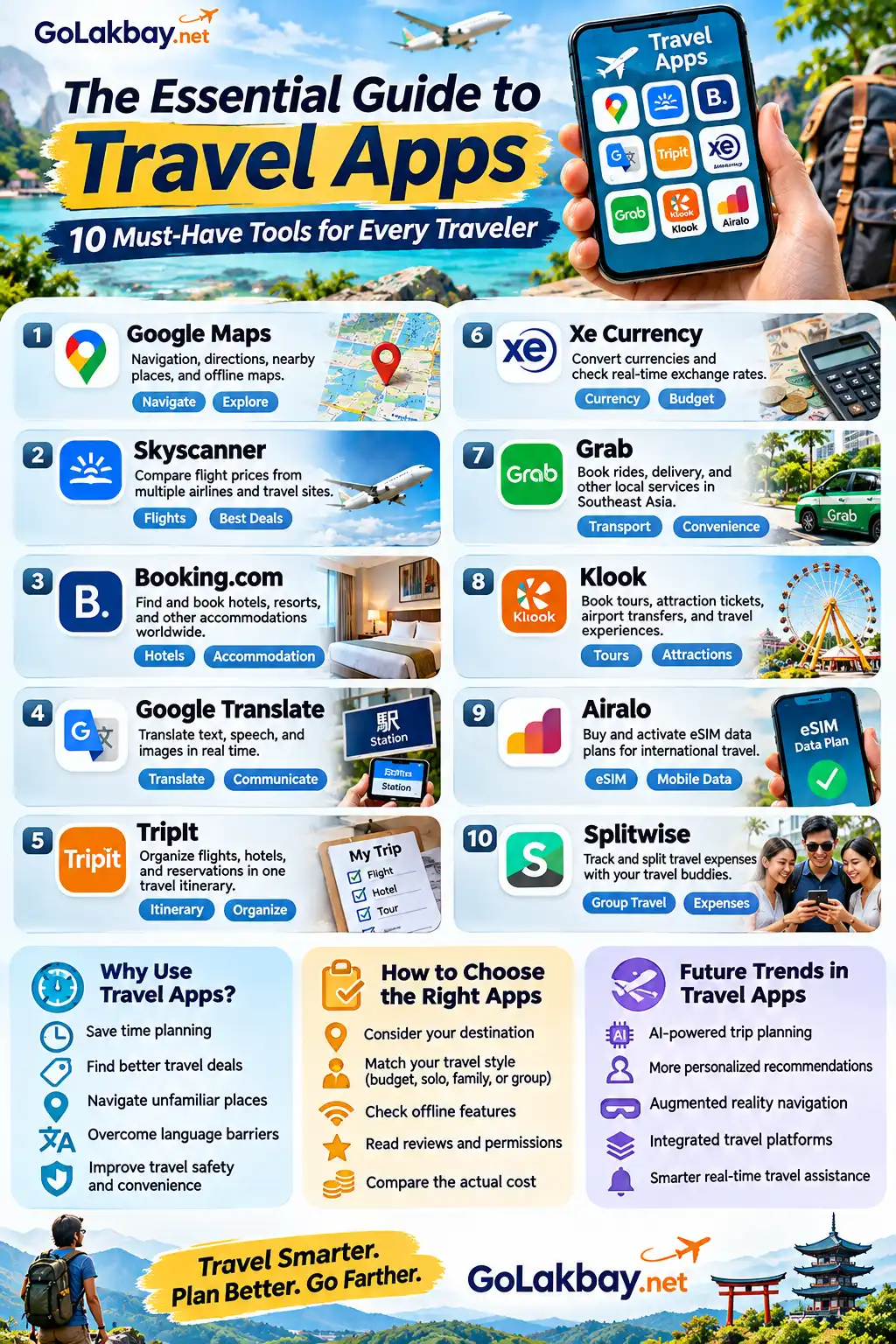
In this guide, we’ll explore the 10 must-have travel apps for 2026 and beyond, explain their benefits, and share practical tips for choosing the right tools for your next adventure.
Why Travel Apps Are Essential for Modern Travelers
Travel apps have changed how people plan, book, and experience their trips. Instead of carrying printed maps, travel guides, hotel confirmations, and complicated itineraries, travelers can now manage most of these tasks using their smartphones.
1. Save Time When Planning Your Trip
Travel apps simplify travel planning by bringing useful information into one place.
You can compare flight prices, search for hotels, check transportation options, and organize your daily itinerary without visiting multiple travel agencies.
For example, a traveler planning a five-day vacation in Japan can use flight comparison tools, hotel booking apps, and digital maps to prepare the entire trip.
2. Find Better Travel Deals
Flight and accommodation prices change regularly. Travel apps help travelers compare available offers and identify potentially cheaper options.
Many platforms also provide price alerts, flexible-date searches, and promotional offers.
For budget-conscious Filipino travelers, these features can make a noticeable difference in the total cost of a vacation.
3. Navigate Unfamiliar Destinations
Getting around a new city can be challenging, especially when public transportation systems and road signs are unfamiliar.
Navigation apps help travelers locate attractions, understand transit routes, estimate travel times, and find nearby services.
Offline maps are particularly useful when mobile data is unavailable or expensive.
4. Overcome Language Barriers
Language translation apps make communication easier when visiting countries where English is not widely spoken.
Some applications translate written text, spoken conversations, and even restaurant menus using a smartphone camera.
This can be especially helpful when traveling to Japan, South Korea, China, or other destinations with different writing systems.
5. Improve Travel Safety and Convenience
Travel apps can help you stay informed about flight changes, severe weather, transportation disruptions, and other issues.
They also make it easier to store booking confirmations and access important travel information.
However, travelers should still verify critical information through official airlines, government agencies, and accommodation providers.
Top 10 Must-Have Travel Apps
The following applications cover the most important travel needs, from booking flights to navigating destinations and managing travel expenses.
1. Google Maps – Best for Navigation and Local Exploration
Google Maps helps travelers navigate unfamiliar destinations, find attractions, locate restaurants, and plan transportation routes.
It supports driving, walking, and public transportation directions in many destinations. You can also download supported map areas for offline use.
Key features:
- Turn-by-turn navigation and directions
- Public transportation route information
- Restaurant and attraction discovery
- Offline maps for selected areas
- Reviews, photos, and business information
Best for: Solo travelers, backpackers, families, and first-time visitors.
Cost: Free
Website: Google Maps
Travel tip: Download your destination’s offline map before leaving your hotel. Offline navigation is useful when mobile data is unavailable, although live traffic and some transportation features still require connectivity.
2. Skyscanner – Best for Comparing Flight Prices
Skyscanner compares flight options from airlines and travel booking providers, helping travelers identify routes and fares that fit their budget.
Its flexible-date search is useful when your travel dates aren’t fixed. Price alerts can also help you monitor fare changes.
Key features:
- Flight price comparisons
- Flexible travel date searches
- Price alerts
- Airline and travel agency comparisons
- Domestic and international flight searches
Best for: Budget travelers and travelers with flexible schedules.
Cost: Free to search; booking prices depend on the provider.
Website: Skyscanner
Travel tip: Always compare the final price, including baggage, seat selection, and other charges. The cheapest advertised fare is not necessarily the cheapest overall booking.
You can also search and compare flights through GoLakbay.
3. Booking.com – Best for Hotels and Accommodation
Booking.com provides access to hotels, apartments, resorts, guesthouses, and other accommodation options around the world.
Travelers can filter properties by price, location, facilities, guest reviews, and cancellation policies.
Key features:
- Hotel and accommodation searches
- Guest reviews and property ratings
- Location-based accommodation filters
- Cancellation policy information
- Booking confirmation management
Best for: Couples, families, solo travelers, and business travelers.
Cost: Free to search; accommodation charges vary.
Website: Booking.com
Travel tip: Check the property’s location, recent guest reviews, and total price before confirming your reservation. A cheaper hotel far from public transportation could increase your overall travel expenses.
Explore additional accommodation options through GoLakbay Hotels.
4. Google Translate – Best for Language Translation
Google Translate helps travelers communicate across language barriers using typed text, speech, and camera-based translation.
It can help you read signs, understand menus, and ask simple questions while traveling.
Key features:
- Text translation between supported languages
- Camera-based translation
- Speech translation
- Conversation assistance
- Downloadable offline language packs
Best for: International travelers visiting countries with unfamiliar languages.
Cost: Free
Website: Google Translate
Travel tip: Download the relevant language pack before traveling. Remember that automated translation may not always capture local expressions or important details accurately.
5. TripIt – Best for Organizing Travel Itineraries
TripIt organizes flights, accommodation reservations, transportation bookings, and other trip details into a consolidated itinerary.
Instead of searching through different confirmation emails, travelers can keep important reservation information together.
Key features:
- Organized travel itineraries
- Reservation information management
- Calendar integration
- Trip sharing
- Additional travel monitoring features in its paid plan
Best for: Frequent travelers, business travelers, and people visiting multiple destinations.
Cost: Free basic version; paid Pro subscription available.
Website: TripIt
Travel tip: Keep a separate offline copy of important booking confirmations in case your itinerary app or internet connection becomes unavailable.
6. Xe Currency – Best for Currency Conversion
Xe Currency helps travelers convert foreign currencies and understand exchange rates when shopping, eating out, or paying for transportation abroad.
For example, a Filipino traveler in Japan can estimate the peso equivalent of a meal priced in Japanese yen.
Key features:
- Currency conversion
- Exchange-rate information
- Historical currency data
- Support for multiple currencies
- Exchange-rate alerts and other financial tools where supported
Best for: International travelers and budget-conscious tourists.
Cost: Free currency conversion tools; transaction fees may apply to other services.
Website: Xe Currency
Travel tip: Currency conversion apps show reference rates, which may differ from the rates offered by banks, money changers, and payment cards.
7. Grab – Best for Transportation in Southeast Asia
Grab is useful for travelers visiting supported cities in the Philippines and other Southeast Asian countries.
Depending on the destination, the app offers ride-hailing, food delivery, and other local services.
Key features:
- Ride-hailing services
- Estimated fares before booking
- Driver and vehicle information
- Cashless payment options where supported
- Food delivery in supported areas
Best for: Travelers visiting cities in Southeast Asia.
Cost: Free app; rides and services are charged separately.
Website: Grab
Travel tip: Check the driver’s name, vehicle details, and license plate before entering a booked vehicle.
8. Klook – Best for Tours and Attractions
Klook helps travelers discover and book activities, attraction tickets, airport transfers, and other travel experiences.
It is particularly useful for travelers visiting popular Asian destinations such as Japan, Hong Kong, Singapore, and South Korea.
Key features:
- Attraction tickets
- Local tours and activities
- Airport transportation services
- Selected transportation passes
- Digital booking confirmations
Best for: Families, couples, and travelers planning sightseeing activities.
Cost: Free app; activities and services have varying prices.
Website: Klook
Travel tip: Compare attraction packages carefully. Some tickets require advance reservations or must be used on a specific date.
9. Airalo – Best for International Mobile Data
Airalo offers travel eSIM data plans for supported countries and regions.
Travelers with compatible unlocked smartphones can purchase and activate a plan without changing their physical SIM card.
Key features:
- Country-specific eSIM plans
- Regional and multi-country plans
- Digital eSIM installation
- Mobile data usage management
- Plan purchases and top-ups where available
Best for: International travelers who need mobile internet access.
Cost: Paid data plans; prices depend on the destination and package.
Website: Airalo
Travel tip: Verify that your smartphone supports eSIM technology and is carrier-unlocked before purchasing a travel data package. Also check whether your selected plan includes data only or supports calls and text messages.
10. Splitwise – Best for Group Travel Expenses
Splitwise helps groups track shared expenses, including accommodation, meals, transportation, and attraction tickets.
It calculates how much each traveler owes, reducing confusion when splitting costs.
Key features:
- Shared expense tracking
- Group expense organization
- Balance calculations
- Expense categories
- Additional features through its paid plan
Best for: Friends, families, and groups traveling together.
Cost: Free version with limitations; paid Pro subscription available.
Website: Splitwise
Travel tip: Agree on expense-sharing rules before your trip. Decide whether accommodation, transportation, and meals will be split equally or according to individual usage.
Travel Apps Comparison: Which Should You Download?
Not every traveler needs all ten applications. The best combination depends on your destination, budget, and travel style.
| Travel Need | Recommended App | Main Advantage |
|---|---|---|
| Navigation | Google Maps | Directions and offline maps |
| Cheap flights | Skyscanner | Flight comparison |
| Hotels | Booking.com | Accommodation choices |
| Translation | Google Translate | Language assistance |
| Trip planning | TripIt | Organized reservations |
| Currency conversion | Xe Currency | Exchange-rate reference |
| Local transportation | Grab | Ride-hailing |
| Attractions | Klook | Tours and tickets |
| Internet access | Airalo | Travel eSIM |
| Group expenses | Splitwise | Shared-cost tracking |
Note: App features, pricing, availability, and free-plan limits may change. Always check the official application before traveling.
How to Choose the Right Travel Apps for Your Needs
Downloading every popular travel application isn’t necessary. Instead, focus on the tools that solve problems you’re most likely to encounter.
Consider Your Travel Destination
Different destinations require different apps.
For example, Google Maps and Grab may be convenient in many Southeast Asian cities, while travelers in Japan may also benefit from local rail and transit information.
Before departure, check whether your preferred apps support the country you’re visiting.
Choose Apps Based on Your Travel Style
Budget travelers: Prioritize Skyscanner, Google Maps, Xe Currency, and Booking.com to compare prices and manage expenses.
Solo travelers: Consider Google Maps, Google Translate, Airalo, and TripIt for navigation, communication, connectivity, and itinerary management.
Family travelers: Booking.com, Klook, Google Maps, and TripIt can help organize accommodation, activities, transportation, and travel schedules.
Group travelers: Splitwise, Booking.com, Grab, and TripIt are useful for managing shared expenses, transportation, and reservations.
Check Offline Functionality
Internet access isn’t always reliable when traveling.
Choose applications that allow you to download maps, language packs, or reservation details before departure.
Remember that offline maps may not include live traffic, current transit schedules, or newly updated business information.
Read Reviews and Check App Permissions
Before installing an unfamiliar application, review its ratings, developer information, privacy policy, and requested permissions.
Download apps from official stores rather than unknown websites.
Avoid giving an app access to contacts, photos, or precise location unless those permissions are needed for the feature you’re using.
Compare the Actual Cost
An app described as free may still charge for premium features, bookings, subscriptions, or transactions.
Check the total price, including service fees, taxes, currency conversion charges, and cancellation conditions.
For flight and hotel bookings, compare the final checkout price rather than relying only on the advertised starting rate.
Essential Travel Apps and Online Tools for Filipino Travelers
Filipino travelers should also prepare several official travel-related tools and websites.
These are not necessarily downloadable apps, but they can be just as important as the ten applications above.
Philippine eTravel
The Philippine government’s eTravel system provides an online registration platform for travelers covered by Philippine arrival and departure requirements.
Use the official Philippine eTravel website and check the current registration rules before your flight.
eTravel registration is free through the official government platform. Be careful of unofficial websites requesting unnecessary payments.
Airline Mobile Apps
If you’re flying with Cebu Pacific, Philippine Airlines, or AirAsia, consider installing the relevant airline’s official app.
Depending on the airline and booking, you may be able to:
- Check in online
- Manage flight reservations
- Purchase additional baggage
- Access booking confirmations
- Receive flight notifications
Always verify flight schedules and travel requirements directly with your airline.
GoLakbay Flight and Hotel Search
You can also compare travel options using GoLakbay’s booking tools.
Looking for affordable flights? Visit GoLakbay Flight Search to explore available flight options.
Need accommodation? Visit GoLakbay Hotel Search to explore hotels and other accommodation options for your destination.
How to Prepare Your Travel Apps Before Departure
Installing the right apps is only the first step. Proper preparation helps ensure they work when you need them.
Use this checklist before leaving home:
- Download and update essential travel applications.
- Save offline maps for your destination.
- Download language packs for translation.
- Save hotel addresses and booking confirmations.
- Check international roaming or eSIM compatibility.
- Enable airline notifications for flight updates.
- Set up secure payment methods and account verification.
- Save emergency contacts and travel insurance information.
- Bring a power bank that meets your airline’s safety requirements.
- Keep important travel documents accessible offline.
Important: Do not rely exclusively on your smartphone for critical travel information. Keep backup copies of important documents and emergency contacts.
Future Trends in Travel Apps
Travel technology continues to evolve. Artificial intelligence, digital identity systems, and more personalized travel services are changing how travelers discover and manage destinations.
Here are several developments worth watching.
1. AI-Powered Travel Planning
Artificial intelligence is becoming increasingly useful for itinerary creation, destination research, and travel recommendations.
AI-based tools can help travelers organize activities according to their interests, budget, available time, and preferred travel pace.
For example, a traveler planning a three-day trip to Cebu could request an itinerary that includes historical attractions, restaurants, transportation, and estimated daily expenses.
However, AI-generated recommendations should be checked against current schedules, official entry requirements, and actual prices.
2. More Personalized Travel Recommendations
Travel platforms increasingly use preferences, browsing behavior, and previous bookings to suggest relevant accommodation, activities, and destinations.
This could help travelers find experiences suited to their interests, such as adventure tourism, food trips, heritage tours, or family vacations.
Travelers should still review privacy settings and understand how their data is used.
3. Augmented Reality Navigation
Augmented reality, or AR, can display digital directions and information over a live camera view.
Potential uses include identifying landmarks, finding walking directions, and exploring historical attractions with additional visual information.
Although AR navigation already exists in some products, availability and reliability vary by location and device.
4. Integrated Travel Platforms
Travel services are moving toward more connected booking and itinerary experiences.
Instead of managing flights, accommodation, transport, and attractions separately, travelers may increasingly use platforms that bring several services together.
This could simplify trip management, although comparing independent providers will remain important for finding competitive prices.
5. Smarter Real-Time Travel Assistance
Future travel apps may provide more proactive support when flights are delayed, connections are missed, or transportation conditions change.
AI assistants could help travelers understand alternative options and reorganize their schedules.
The usefulness of these features will depend on accurate live data, integration with service providers, and clear confirmation of any booking changes.
Frequently Asked Questions About Travel Apps
What Is the Best Free Travel App?
Google Maps is one of the most versatile free travel applications because it supports navigation, local discovery, and downloadable maps. However, the best app depends on your needs. Skyscanner is useful for flight comparison, while Google Translate helps with communication.
What Travel Apps Should I Download Before Going Abroad?
At a minimum, consider downloading a navigation app, a translation app, your airline’s official app, and an accommodation booking or itinerary management app. You may also need an eSIM app or local transportation app.
Can I Use Travel Apps Without Internet Access?
Some travel apps offer offline features. Google Maps supports downloaded map areas, and Google Translate offers offline language packs for supported languages. Live booking searches, price updates, and ride-hailing generally require internet access.
Are Travel Apps Safe to Use?
Established travel applications can be useful, but no app is completely risk-free. Download from official sources, use strong passwords, enable two-factor authentication when available, and avoid entering sensitive information through suspicious links.
Which Travel Apps Are Best for Budget Travelers?
Skyscanner, Google Maps, Booking.com, and Xe Currency are useful for comparing flights, navigating destinations, finding accommodation, and estimating expenses in foreign currencies.
Do I Need All Ten Travel Apps?
No. Most travelers can start with four or five essential apps and install additional tools depending on the destination and type of trip.
Final Thoughts: Travel Smarter With the Right Apps
Travel apps have become valuable tools for modern travelers. They make it easier to compare prices, organize bookings, navigate unfamiliar cities, communicate in different languages, and manage travel expenses.
The key is choosing applications that match your needs rather than filling your phone with tools you’ll rarely use.
For Filipino travelers planning domestic trips or international vacations, a combination of navigation, flight comparison, accommodation booking, and translation apps provides a strong starting point.
Before your next adventure, download the essentials, prepare offline resources, and verify important travel details through official sources.
With the right preparation, you can spend less time dealing with travel logistics and more time enjoying your destination.
Ready to plan your next trip? Start by comparing flights and exploring hotels through GoLakbay.